

How It Works
The diagram below shows how your system connects with Tidyhire. You can use Tidyhire in two ways:- AI Call — The AI calls candidates on their phone.
- Interview — Candidates receive an email with a link to complete an AI interview.
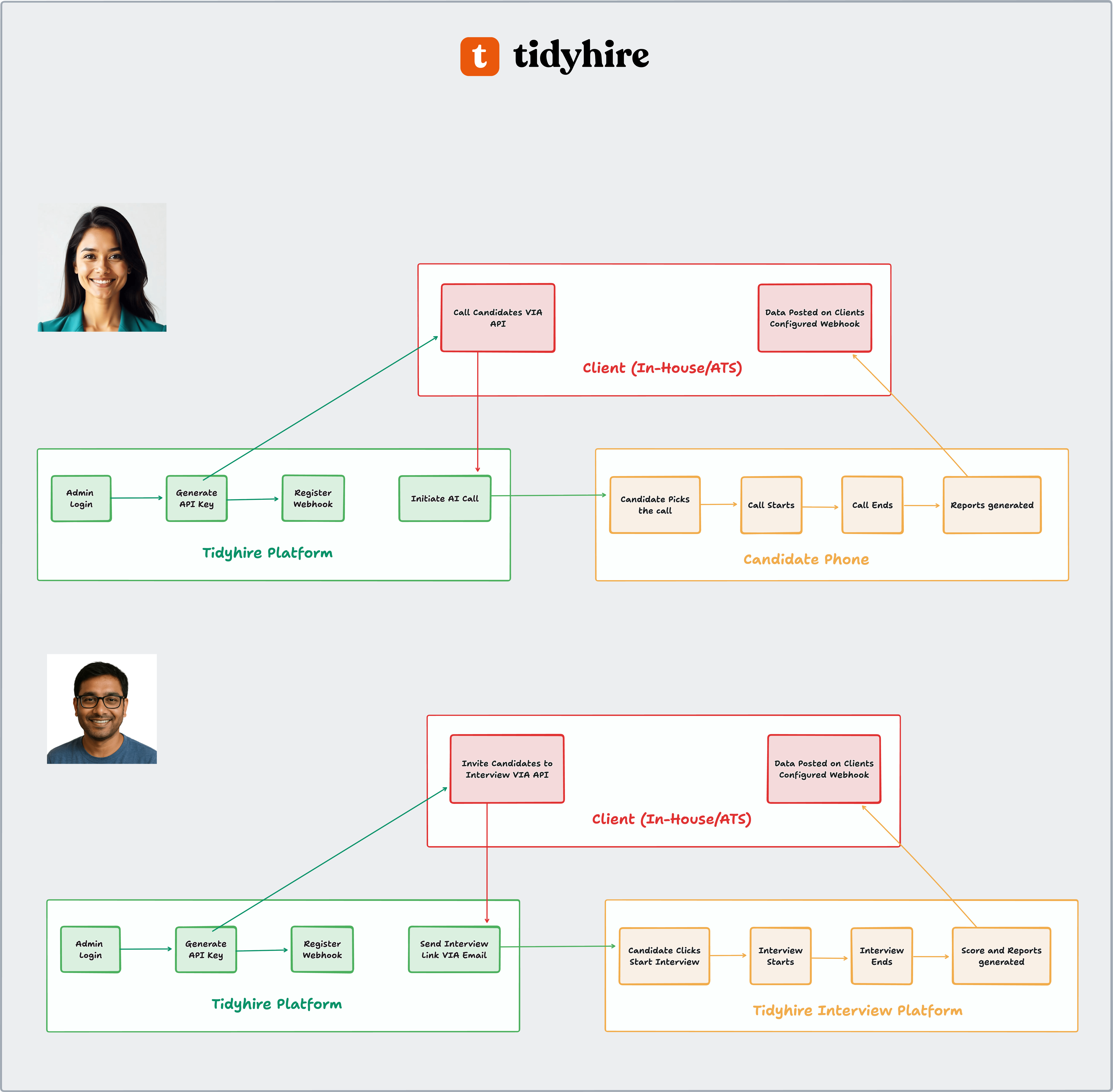
API Integration Flow
1. Setup (One-time)
1
Get your API key
Log in to the Tidyhire Dashboard and create an API key from For Developers > API Keys. See Authentication for details.
2
Set up your webhook
Add a webhook URL from For Developers > Webhooks in your Tidyhire Dashboard so we can send you results. Read more about webhooks.
2. AI Call
Use this when you want the AI to call candidates directly.1
Send the call request
From your system, use the Initiate AI Call API with candidate details and what the AI should talk about. You can also set retry rules, WhatsApp messages, and a schedule time.
2
Candidate receives the call
The candidate gets an AI call on their phone.
3
AI talks to the candidate
The AI follows the script and instructions you provided.
4
Call finishes
The call ends and a report is created.
5
You get the results
Call details, transcripts, and collected data are sent to your webhook URL automatically. Read more about webhooks.
3. Interview
Use this when you want candidates to complete an AI interview on their own time.1
Send the interview invitation
From your system, use the Interview Invite API. The candidate receives an email with a unique interview link.
2
Candidate opens the interview
The candidate clicks the link and starts the interview.
3
AI conducts the interview
The AI asks the questions and tasks you configured.
4
Interview finishes
The interview ends and scores and reports are created.
5
You get the results
Scores and report links are sent to your webhook URL automatically. You can then update the candidate status in your system. Read more about webhooks.