

Overview
Webhooks allow you to receive real-time HTTP notifications when specific events occur in your Tidyhire workspace. When an event is triggered, Tidyhire sends aPOST request to your configured URL with the event payload.
Setting Up Webhooks
- Navigate to For Developers > Webhooks in your Tidyhire Dashboard.
- Click + Add Webhook.
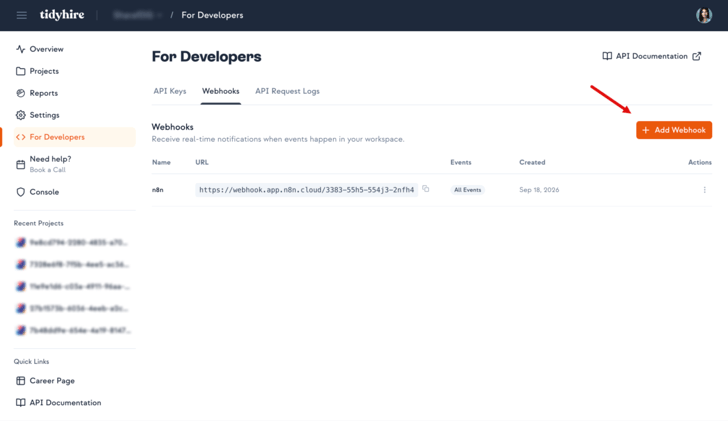
Dashboard > For Developers > Webhooks
- Enter your Webhook URL — the endpoint that will receive event payloads.
- Select the events you want to subscribe to.
- Click Create.
Testing Webhooks
You can send a test event to any active webhook from the Tidyhire Dashboard. This sends a sample payload to your URL so you can verify your integration is working correctly before going live.Best Practices
- Use HTTPS — Always use an HTTPS endpoint to ensure payload data is encrypted in transit.
- Respond quickly — Return a 2xx response as soon as possible. Process the payload asynchronously if needed.
- Verify the payload — Validate incoming data before processing to guard against unexpected payloads.
- Handle duplicates — Design your handler to be idempotent in case the same event is delivered more than once.
In This Section
Event Types
The events Tidyhire can send to your webhook.
Response Structure
The payload format for webhooks.
Retries & Replies
What happens when delivery fails and how to acknowledge events.