> ## Documentation Index
> Fetch the complete documentation index at: https://docs.tidyhire.app/llms.txt
> Use this file to discover all available pages before exploring further.
# Webhooks
> Receive real-time notifications when events happen in your workspace
## Overview
Webhooks allow you to receive real-time HTTP notifications when specific events occur in your Tidyhire workspace. When an event is triggered, Tidyhire sends a `POST` request to your configured URL with the event payload.
## Setting Up Webhooks
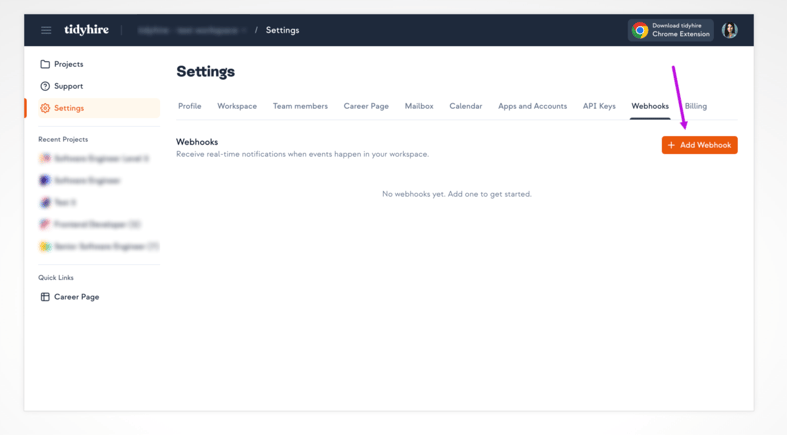
1. Navigate to **Settings** > **Webhooks** in your [Tidyhire Dashboard](https://platform.tidyhire.app/app/settings#webhooks).
2. Click **+ Add Webhook**.
 3. Enter your **Webhook URL** — the endpoint that will receive event payloads.
4. Select the **events** you want to subscribe to.
5. Click **Create**.
## Supported Events
| Event | Description |
| ----------------- | --------------------------------------------- |
| `interview.ended` | Fired when a candidate completes an interview |
| `call.ended` | Fired when an AI call ends |
You can subscribe to all events by selecting **all events** when creating your webhook. This way you'll automatically receive new event types as they are added.
## Payload Format
When an event is triggered, Tidyhire sends a `POST` request to your webhook URL with a JSON payload:
```json theme={null}
{
"event": "",
"data": { ... }
}
```
| Field | Type | Description |
| ------- | ------ | --------------------------------------- |
| `event` | string | The event name (e.g. `interview.ended`) |
| `data` | object | Event-specific payload data |
## Responding to Webhooks
Your endpoint should return a **2xx** status code to acknowledge receipt. If Tidyhire does not receive a successful response, the delivery is considered failed.
## Testing Webhooks
You can send a test event to any active webhook from the Tidyhire Dashboard. This sends a sample payload to your URL so you can verify your integration is working correctly before going live.
## Best Practices
* **Use HTTPS** — Always use an HTTPS endpoint to ensure payload data is encrypted in transit.
* **Respond quickly** — Return a 2xx response as soon as possible. Process the payload asynchronously if needed.
* **Verify the payload** — Validate incoming data before processing to guard against unexpected payloads.
* **Handle duplicates** — Design your handler to be idempotent in case the same event is delivered more than once.
3. Enter your **Webhook URL** — the endpoint that will receive event payloads.
4. Select the **events** you want to subscribe to.
5. Click **Create**.
## Supported Events
| Event | Description |
| ----------------- | --------------------------------------------- |
| `interview.ended` | Fired when a candidate completes an interview |
| `call.ended` | Fired when an AI call ends |
You can subscribe to all events by selecting **all events** when creating your webhook. This way you'll automatically receive new event types as they are added.
## Payload Format
When an event is triggered, Tidyhire sends a `POST` request to your webhook URL with a JSON payload:
```json theme={null}
{
"event": "",
"data": { ... }
}
```
| Field | Type | Description |
| ------- | ------ | --------------------------------------- |
| `event` | string | The event name (e.g. `interview.ended`) |
| `data` | object | Event-specific payload data |
## Responding to Webhooks
Your endpoint should return a **2xx** status code to acknowledge receipt. If Tidyhire does not receive a successful response, the delivery is considered failed.
## Testing Webhooks
You can send a test event to any active webhook from the Tidyhire Dashboard. This sends a sample payload to your URL so you can verify your integration is working correctly before going live.
## Best Practices
* **Use HTTPS** — Always use an HTTPS endpoint to ensure payload data is encrypted in transit.
* **Respond quickly** — Return a 2xx response as soon as possible. Process the payload asynchronously if needed.
* **Verify the payload** — Validate incoming data before processing to guard against unexpected payloads.
* **Handle duplicates** — Design your handler to be idempotent in case the same event is delivered more than once.