> ## Documentation Index
> Fetch the complete documentation index at: https://docs.tidyhire.app/llms.txt
> Use this file to discover all available pages before exploring further.
# Integration Flow
> Understand how the Tidyhire API integration works end-to-end
## How It Works
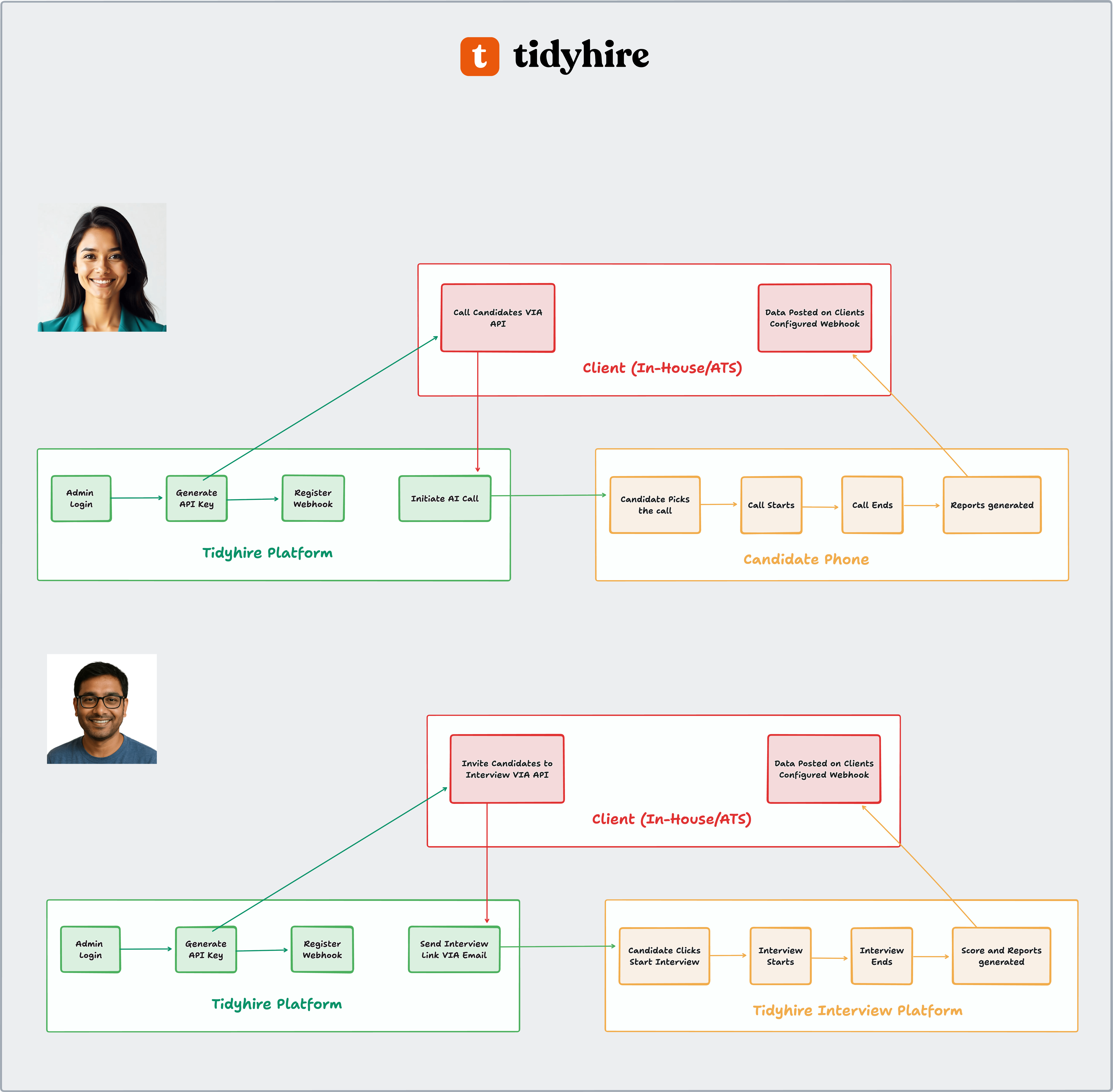
The diagram below shows how your system connects with Tidyhire.
You can use Tidyhire in two ways:
* **AI Call** — The AI calls candidates on their phone.
* **Interview** — Candidates receive an email with a link to complete an AI interview.
 ***
### 1. Setup (One-time)
Log in to the [Tidyhire Dashboard](https://platform.tidyhire.app) and create an API key from **Settings > API Keys**. See [Authentication](/api-reference/authentication) for details.
Add a webhook URL in your Tidyhire Dashboard so we can send you results. See [Webhooks](/api-reference/webhooks) for details.
***
### 2. AI Call
Use this when you want the AI to call candidates directly.
From your system, use the [Initiate AI Call API](/api-reference/endpoint/call-initiate) with candidate details and what the AI should talk about. You can also set retry rules, WhatsApp messages, and a schedule time.
The candidate gets an AI call on their phone.
The AI follows the script and instructions you provided.
The call ends and a report is created.
Call details, transcripts, and collected data are sent to your webhook URL automatically.
***
### 3. Interview
Use this when you want candidates to complete an AI interview on their own time.
From your system, use the [Interview Invite API](/api-reference/endpoint/interview-invite). The candidate receives an email with a unique interview link.
The candidate clicks the link and starts the interview.
The AI asks the questions and tasks you configured.
The interview ends and scores and reports are created.
Scores and report links are sent to your webhook URL automatically. You can then update the candidate status in your system.
***
### 1. Setup (One-time)
Log in to the [Tidyhire Dashboard](https://platform.tidyhire.app) and create an API key from **Settings > API Keys**. See [Authentication](/api-reference/authentication) for details.
Add a webhook URL in your Tidyhire Dashboard so we can send you results. See [Webhooks](/api-reference/webhooks) for details.
***
### 2. AI Call
Use this when you want the AI to call candidates directly.
From your system, use the [Initiate AI Call API](/api-reference/endpoint/call-initiate) with candidate details and what the AI should talk about. You can also set retry rules, WhatsApp messages, and a schedule time.
The candidate gets an AI call on their phone.
The AI follows the script and instructions you provided.
The call ends and a report is created.
Call details, transcripts, and collected data are sent to your webhook URL automatically.
***
### 3. Interview
Use this when you want candidates to complete an AI interview on their own time.
From your system, use the [Interview Invite API](/api-reference/endpoint/interview-invite). The candidate receives an email with a unique interview link.
The candidate clicks the link and starts the interview.
The AI asks the questions and tasks you configured.
The interview ends and scores and reports are created.
Scores and report links are sent to your webhook URL automatically. You can then update the candidate status in your system.