> ## Documentation Index
> Fetch the complete documentation index at: https://docs.tidyhire.app/llms.txt
> Use this file to discover all available pages before exploring further.
# Authentication
> Learn how to authenticate your API requests
## Obtaining Your API Key
To use the Tidyhire API, you need an API key. You can generate one from your [Tidyhire Dashboard](https://platform.tidyhire.app/app/settings#api-keys).
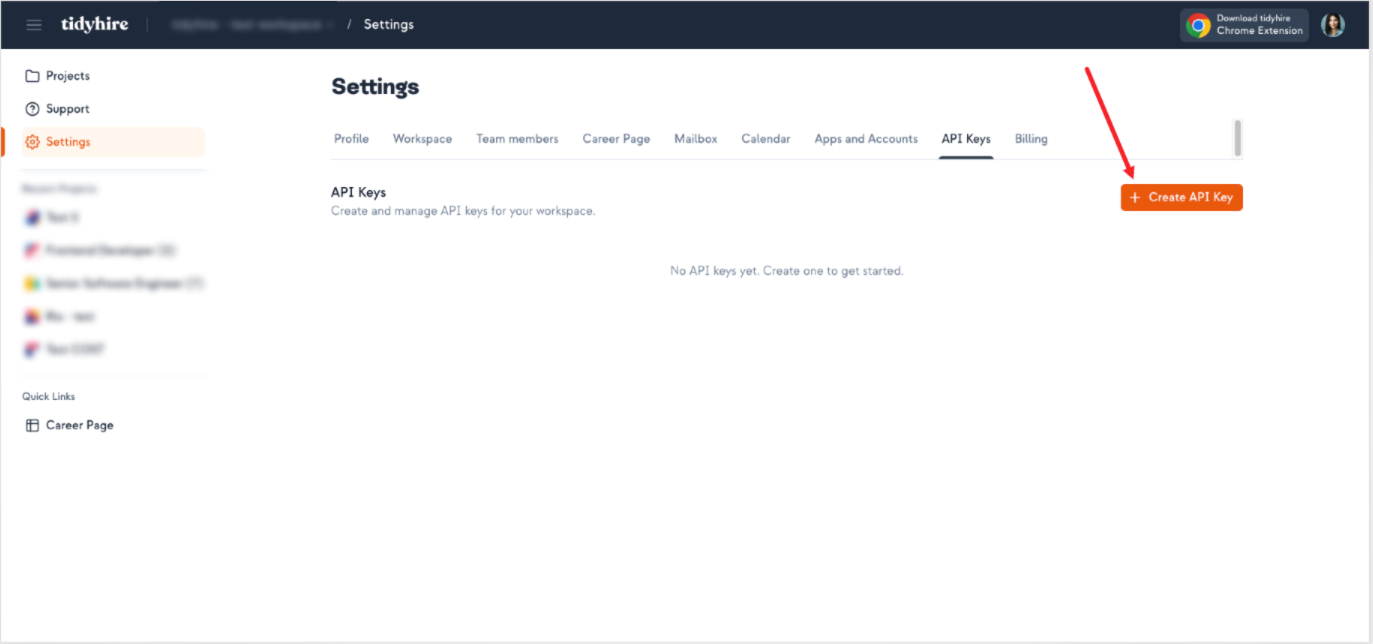
1. Navigate to **Settings** > **API Keys** in your Tidyhire Dashboard.
2. Click **+ Create API Key**.
 ## Using Your API Key
Include your API key in the `x-tidyhire-api-key` header with every request.
```bash cURL theme={null}
curl -X GET https://api.tidyhire.app/api/public/v1/ \
-H "x-tidyhire-api-key: YOUR_API_KEY"
```
```javascript JavaScript theme={null}
fetch('https://api.tidyhire.app/api/public/v1/', {
method: 'GET',
headers: {
'x-tidyhire-api-key': 'YOUR_API_KEY'
}
});
```
```python Python theme={null}
import requests
response = requests.get(
'https://api.tidyhire.app/api/public/v1/',
headers={
'x-tidyhire-api-key': 'YOUR_API_KEY'
}
)
```
## Security Best Practices
* **Never expose your API key** in client-side code or public repositories
* **Store your API key** in environment variables or a secrets manager
* **Rotate your API key** periodically from the Tidyhire Dashboard
* **Use separate keys** for development and production environments
## Using Your API Key
Include your API key in the `x-tidyhire-api-key` header with every request.
```bash cURL theme={null}
curl -X GET https://api.tidyhire.app/api/public/v1/ \
-H "x-tidyhire-api-key: YOUR_API_KEY"
```
```javascript JavaScript theme={null}
fetch('https://api.tidyhire.app/api/public/v1/', {
method: 'GET',
headers: {
'x-tidyhire-api-key': 'YOUR_API_KEY'
}
});
```
```python Python theme={null}
import requests
response = requests.get(
'https://api.tidyhire.app/api/public/v1/',
headers={
'x-tidyhire-api-key': 'YOUR_API_KEY'
}
)
```
## Security Best Practices
* **Never expose your API key** in client-side code or public repositories
* **Store your API key** in environment variables or a secrets manager
* **Rotate your API key** periodically from the Tidyhire Dashboard
* **Use separate keys** for development and production environments